
AI Cost Optimization: Cutting LLM & Cloud Spend After Deployment
Once an AI system is live, the cost conversation changes shape. Building it is one question. We covered that in the real cost of an AI MVP. Running it is another question, and the bill keeps climbing even when usage stays flat. Gartner forecasts worldwide AI spending will hit $2.59 trillion in 2026, up 47% year-over-year, with buyers now prioritizing cost visibility over raw capability. This guide covers the levers that cut ongoing LLM and cloud spend without hurting output quality: model routing, caching, and right-sizing.
 By: Asad Siddiq
Why Does AI Cost Scrutiny Increase After Deployment, Not Before?

During a pilot, cost is a rounding error next to the question of whether the system works at all. Then it goes into production and usage grows. The same architecture that made sense at pilot scale starts compounding into a real budget line. That means routing every query to the most capable model available. It means generating a fresh response for every request. It means running inference on always-on GPU capacity sized for peak load. Industry analysis of production LLM deployments finds that inference now accounts for the majority of ongoing enterprise AI GPU spend, ahead of training. That is the opposite of where most teams focus their initial cost planning.
What Is Model Routing and Why Does It Cut Cost Without Cutting Quality?
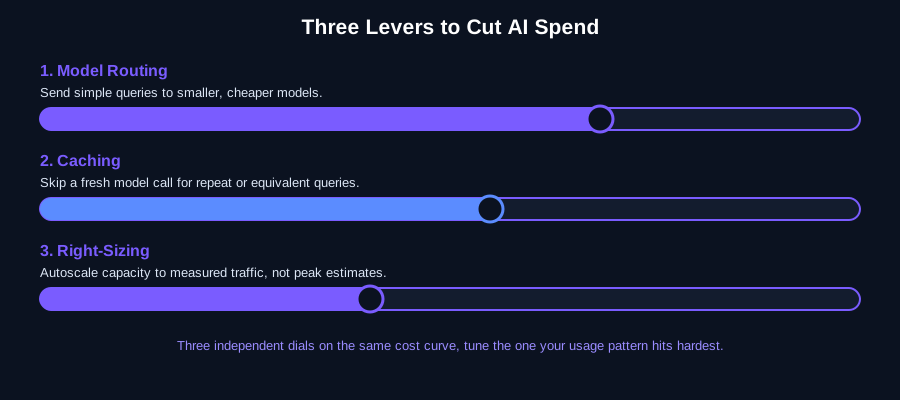
Model routing sends each request to the smallest, cheapest model capable of handling it well. It reserves the largest, most expensive model for the queries that genuinely need it. A customer-support classification task, a document summary, or a simple lookup rarely needs the same model as a complex multi-step reasoning task. But many production systems route everything to one model by default, because that was the simplest thing to ship first. Routing most traffic to smaller, cheaper models while reserving frontier models for genuinely hard queries is one of the more reliable levers for cutting inference cost with minimal quality impact. The cost difference between model tiers is large, while the quality gap on simple tasks is often negligible.
What Does a Model-Routing Rule Actually Look Like?
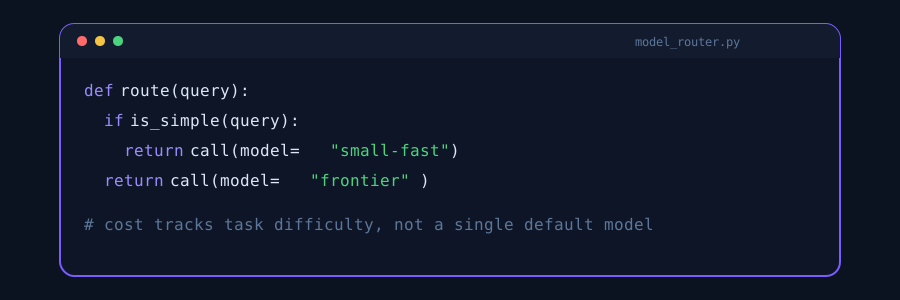
The routing logic itself is rarely complicated: a lightweight classifier or a handful of rules decides whether a query is simple, then sends it to a small, cheap model. Everything else falls through to the larger, more expensive model. Simple classification or lookup queries route cheap. Only queries flagged as genuinely complex fall through to the frontier model, so cost tracks actual task difficulty instead of applying the priciest model to every request by default.
How Much Does Caching Actually Save?
Two forms of caching matter for LLM workloads. Prompt caching avoids reprocessing the same system prompt, instructions, or reference documents on every request when they don't change between calls. It cuts the input-token cost of repetitive prompts. Semantic caching goes further. It recognizes when a new query is semantically equivalent to one already answered, and serves the cached response instead of a fresh model call. For workloads with repetitive query patterns, an internal support bot answering the same handful of policy questions, an FAQ assistant, a document classifier, semantic caching can eliminate a meaningful share of model calls entirely. The catch is that caching needs a defined invalidation strategy. Cached answers that reference source documents have to expire or refresh when those documents change, or the system starts confidently serving stale answers.
What Does Right-Sizing Cloud Infrastructure Mean for AI Workloads?
Right-sizing means matching compute capacity to actual, measured usage patterns instead of provisioning for a peak-load estimate made before launch. This is standard MLOps and cloud discipline applied to AI infrastructure. Autoscale GPU or inference capacity based on real traffic rather than running fixed capacity around the clock. Batch asynchronous requests instead of processing them one at a time. Periodically re-evaluate whether a workload still needs the model tier it was originally built on, as smaller, cheaper models improve. Teams that skip this step are usually paying for capacity sized for a traffic estimate made before they had any real usage data to size against.
A Practical Cost-Optimization Checklist
- Audit which requests actually need your most expensive model tier versus a smaller one; route accordingly.
- Add prompt caching for any system prompt, instructions, or reference document reused across requests.
- Add semantic caching for workloads with repetitive query patterns, with a clear invalidation rule tied to source-document changes.
- Autoscale inference capacity to measured traffic instead of a pre-launch peak-load estimate.
- Re-evaluate model tier choice quarterly, not once at launch, as smaller models improve and pricing shifts.
How Does This Relate to Choosing the Right Model in the First Place?
Cost optimization after deployment is easier when the initial model and architecture choice already accounted for ongoing spend, not just capability. That is the core question covered in our LLM optimization guide. A system built on a single always-on frontier model with no routing or caching layer will always cost more to optimize retroactively. That is true compared to one designed from the start with tiered model access and a caching strategy built in. If your system is already live and costs have crept up, the fix is not necessarily switching providers. It is usually adding the routing and caching layer that should have been there from the first production release.
How Do You Classify a Query as Simple Before Routing It?
The classifier deciding simple versus complex does not need to be another LLM call, which would defeat the point. Most production routers use a cheap heuristic first: query length, presence of a known intent pattern, or a lightweight, purpose-built classification model trained once on historical traffic. Only queries that fail that fast check, or that a support agent manually escalates, get treated as complex. Reserving an LLM-based classifier for the small fraction of ambiguous cases keeps the routing decision itself from adding meaningful cost.
How Should a Team Prioritize Which Lever to Implement First?

Start by profiling actual usage, not by guessing. Pull a month of production logs and break down cost by request type. Which queries are simple lookups or classifications currently hitting an expensive model? Which prompts repeat the same system instructions or reference documents on every call? Which hours or days show usage spikes that fixed capacity is provisioned for around the clock? That breakdown usually makes the priority obvious. A support system where 80% of queries are simple FAQ lookups gets the fastest win from model routing. A RAG system with a large, static system prompt gets the fastest win from prompt caching. A batch-processing workload with predictable idle periods gets the fastest win from autoscaling. Implementing all three eventually is reasonable. But profiling first prevents spending engineering time on the lever that matters least for your specific traffic pattern.
Is There a Risk of Over-Optimizing and Hurting Output Quality?
Yes, and it is the most common mistake teams make once cost pressure sets in. That means routing too aggressively to smaller models on tasks that actually needed the larger model's reasoning. It also means caching answers on queries where even small variation in the question changes the correct answer. The safeguard is measuring quality alongside cost at every optimization step, not just cost in isolation. Track a quality metric relevant to your use case, task success rate, escalation rate to a human, customer satisfaction, before and after each change. Treat any optimization that moves cost down but quality down together as a rollback candidate, not a win.
What Does a Cost-Optimized Architecture Look Like End to End?
Put together, a request in a cost-optimized system passes through three checks before it reaches an expensive model call. First, does an exact or semantic cache already hold the answer? If so, serve it and stop there. Second, does the query classify as simple? If so, route it to a small model. Third, only requests that clear both checks reach the frontier model, and even then run on autoscaled capacity sized to measured traffic rather than a fixed peak-load reservation. Each layer removes a share of the volume that would otherwise hit the most expensive part of the stack.
What Should You Measure Before Calling an Optimization Done?
Cost per resolved request is a better metric to track than raw model spend, because it accounts for both sides of the trade at once. A system that cuts model spend by half but doubles the escalation rate to a human agent has not actually gotten cheaper once support labor is counted. Track cost per resolved request, or whatever the equivalent successful outcome is for your workload, before and after each change, and treat the result as the real answer rather than the model bill alone.
Frequently asked questions
Why does AI cost become a bigger issue after deployment than during the pilot?
Pilot-stage architecture choices, like routing every query to the most capable model or running always-on GPU capacity, scale linearly or worse in cost once real production usage grows, catching teams off guard on their first full production bill.
What is model routing and how does it reduce AI costs?
Model routing sends each request to the smallest, cheapest model that can handle it well, reserving larger, more expensive models only for genuinely complex queries, which cuts inference cost with minimal impact on output quality for simple tasks.
Is caching safe to use for AI systems that reference changing documents?
Yes, but only with a defined invalidation strategy. Cached responses tied to source documents need to expire or refresh when those documents change, otherwise the system will confidently serve stale, outdated answers.
Should we switch AI providers to reduce costs?
Not usually as a first step. Most cost creep comes from missing routing, caching, and right-sizing layers rather than provider pricing itself, and adding those layers is usually cheaper and less disruptive than a provider migration.
How do you decide which queries a model router should classify as simple?
Most production routers start with a cheap heuristic, query length, a known intent pattern, or a lightweight classifier trained on historical traffic, rather than using another LLM call to make the routing decision, which would add cost instead of cutting it.
In what order should caching, routing, and right-sizing run in a request pipeline?
Check the cache first, since a cache hit avoids a model call entirely. Route anything that misses the cache by complexity next, sending simple queries to a smaller model. Only requests that clear both steps should reach the most expensive model tier, ideally on autoscaled rather than fixed capacity.
Want this built for your team?
We ship production-grade AI like this across every industry, in weeks, not months.